Pay Theory GraphQL API
The Pay Theory API is built to use GraphQL.
GraphQL is a query language that was used to define the schema for our data set.
This schema is used to outline the data that is available through the API.
To interact with the API, you will post a query to the endpoint.
Here is an example of a query:
{
  transactions(
    limit: 3
    ) {
    items {

        transaction_id
    }
  }
}
and its response:
{
    "data": {
        "transactions": {
            "items": [
                {
                    "transaction_id": "pt-start-paytheorylab-rbdg98004adg"
                },
                {
                    "transaction_id": "pt-start-paytheorylab-rbdgaf004adh"
                },
                {
                    "transaction_id": "pt-start-paytheorylab-rbdgaf004adh:R1"
                }
            ]
        }
    }
}
One of the benefits of using GraphQL is that you can be explicit about what data you want to retrieve.
In the query above, we are asking for the transaction_id of the first three transactions. If you wanted more information, you would simply list it in the item list.
{
  transactions(
    limit: 1
    ) {
    items {
        transaction_id
        settlement_batch
        status
        full_name
    }
  }
}
This query would return the transaction_id, settlement_batch, status, and full_name of the first transaction.
{
    "data": {
        "transactions": {
            "items": [
                {
                    "transaction_id": "pt-start-paytheorylab-rbdg98004adg",
                    "settlement_batch": "23",
                    "status": "SETTLED",
                    "full_name": "John Doe"
                }
            ]
        }
    }
}
Authentication
To authenticate your request, you need to pass an Authorization header with your call.
For a partner the key should have the word partner followed by a semicolon and their secret key:
Authorization: partner;SECRET_KEY
For a merchant or system, the key should have their merchant_uid followed by a semicolon and their secret key:
Authorization: MERCHANT_UID;SECRET_KEY
Note: The secret key is not the same as the API key. You can find your secret key in the Pay Theory Portal under the Settings tab.
This key should be stored securely and not shared with anyone. It should be used server side, stored in an environment variable, and not embedded in your mobile applications or websites.
POST GraphQL Query
Queries are then executed by sending POST HTTP requests to the endpoint. You can find the API endpoint in the Pay Theory Portal under the Settings tab.
curl --location --request POST '{GraphQL API URL}'
--header 'Authorization: MERCHANT_UID;SECRET_KEY'
--header 'Content-Type: application/graphql'
--data '{"query":"{transactions(limit: 3) { items { transaction_id }}}"}'
Variables
You can choose to pass variables into your query instead of putting them directly into the query string.
const queryString = `query MyQuery($payment_method_query: [QueryPair]!, $direction: MoveDirection = FORWARD, $limit: Int!, $offset: String, $transaction_query: SqlQuery, $offset_id: String) {
    transactions(direction: $direction, limit: $limit, offset: $offset, query: $transaction_query, offset_id: $offset_id) {
        total_row_count
        items {
            status
            transaction_date
            transaction_id
            payment_method(query_list: $payment_method_query) {
                payment_method_id
                last_four
                exp_date
                card_brand
            }
        }
    }
}`
A few things to call out in the query above:
- Variables are declared with the
$symbol and listed in parentheses after the query name. - When declaring the variables you define the type of the variable after the colon.
- You can make a variable required by including an
!after the type. See$payment_method_query: [QueryPair]! - You can set a default for a variable if it is not included in the variables object. See
$direction: MoveDirection = FORWARD
You would then create a variable object to pass in with the call to the API.
const variables = {
    "offset": "ASH79834JIO",
    "limit": 100,
    "payment_method_query": [
        {
            key: "last_four",
            value: "1234",
            operator: EQUAL
        }
    ]
}
The body of the request would then look like this:
const body = {
    query: queryString,
    variables: variables
}
Postman Query Builder
A tool to help build queries is available in Postman.
When you launch postman and enter the request URL into the app it will automatically download the schema and populate the query builder.
You can then leverage it to help you build queries, test calls, and download code samples to use in your codebase.
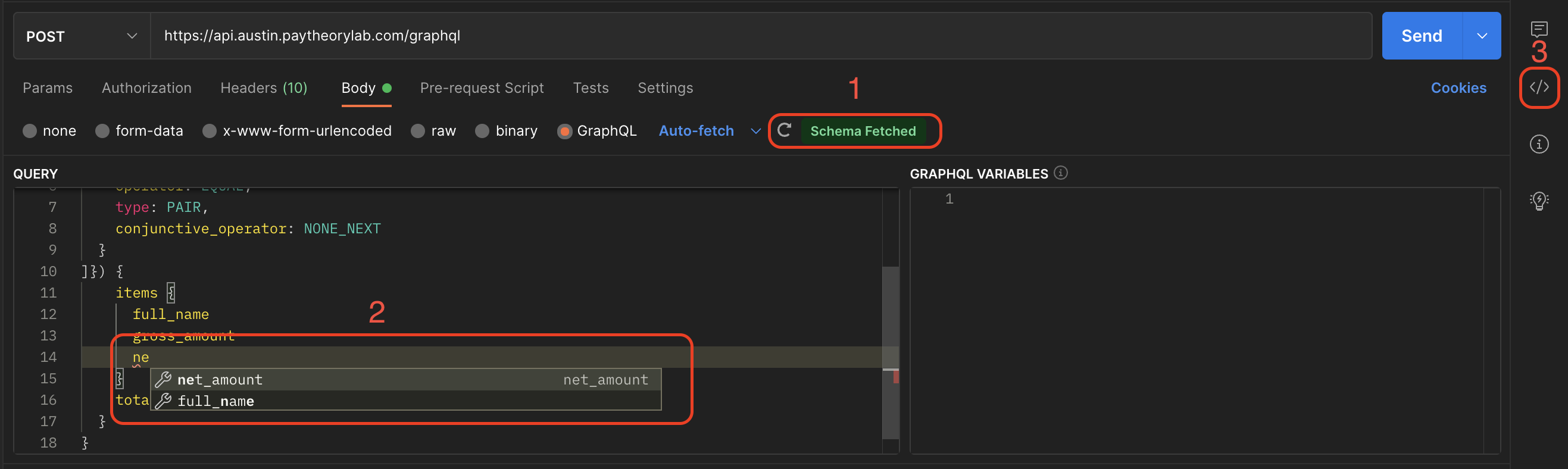
- You can check to see if the schema was fetched and refresh the schema if you expect changes have been made.
- As you type it will have autocomplete to help you fill in the query.
- You can click here to download code snippets for the call you have built.
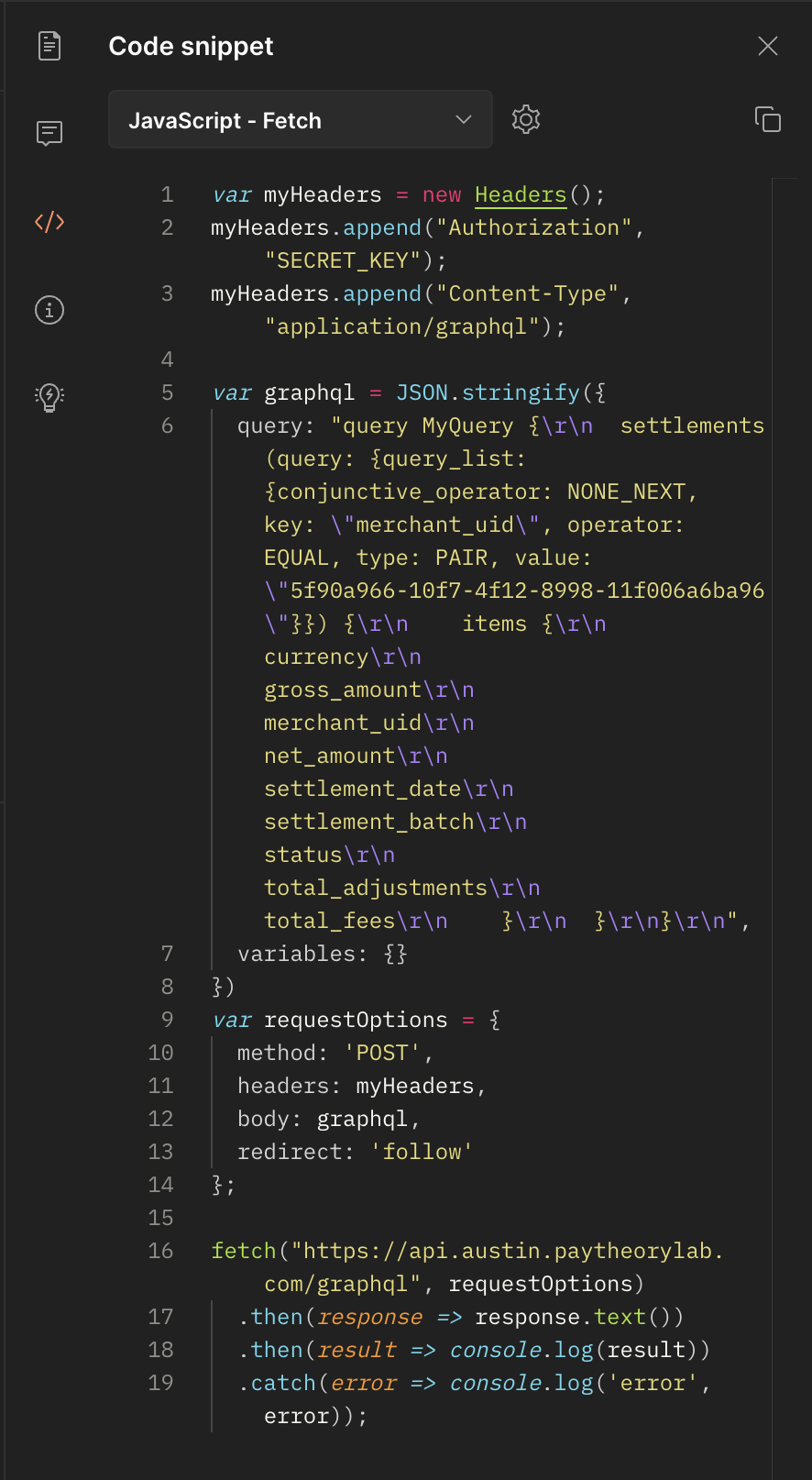
In the dropdown at the top, you can select the language you want to download the code snippet in. It has a rather extensive list available for you to choose from.