Tokenizing A Payment Method
This quickstart will show you how to securely tokenize a user's payment method so that it can be recalled in a future payment or through a recurring payment.
In order to tokenize a payment method you need be set up to accept online payments.
Accepting Online Payments- Javascript
- Apple
- Android
Run tokenization method
This function is used to tokenize a card or bank account. For further transactions, this token may be used in place of the real payment information, lowering the risk involved with keeping and transferring sensitive data.
// optionally provide details about the payor
const PAYOR_INFO = {
  "first_name": "Some",
  "last_name": "Body",
  "email": "somebody@gmail.com",
  }
const TOKENIZE_PAYMENT_METHOD_PARAMETERS = {
  payorInfo: PAYOR_INFO, // optional
}

paytheory.tokenizePaymentMethod(TOKENIZE_PAYMENT_METHOD_PARAMETERS)
Optional parameters that can be passed into your payment method token
These are the parameters that you can pass into the tokenizePaymentMethod function to tokenize a card or bank account.
| Key | type | description |
|---|---|---|
| payorInfo | object | see the Payor Info object below for details |
| billingInfo | object | see the Billing Info object below for details. This is required if you are not using the zip hosted field. |
| metadata | object | An object that will be stored with the token and can be used to track the token. |
| payorId | string |
|
| expandedResponse | boolean | Defaults to false. With true, a successful response returns the full payment method, and a processor rejection returns FAILED with the reason. |
The function returns a Promise that will contain an object with a key of type. You can expect the following values for type.
Promise return type and expected values
| Type | Description |
|---|---|
| TOKENIZED | The payment method was tokenized successfully and the token will be in the body key. |
| FAILED | The processor rejected the payment method. The reason is in the body key. Only returned with expandedResponse: true. |
| ERROR | The transact call had an error while processing and the error details will be in the error key. |
After the payment is successful you can see the token has been generated and this is how the body looks.
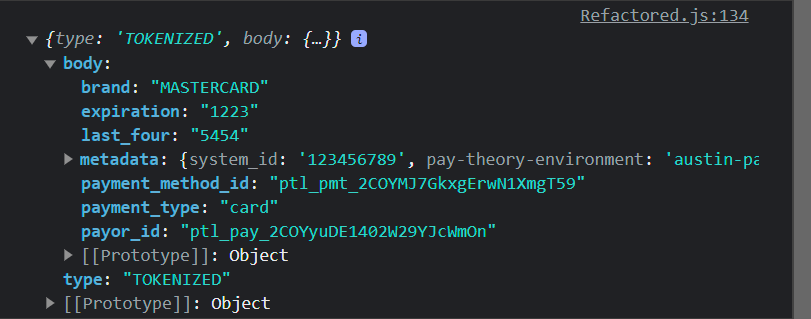
Tokenized response
This is the value of the body key in the response if the type is TOKENIZED:
| Key | type | description |
|---|---|---|
| payment_method_id | string | The Pay Theory id for the payment method token. |
| payor_id | string | The Pay Theory id for the payor that was used for the payment method token. |
| last_four | string | The last four digits of the card number or account number. |
| brand | string | The brand of the card. |
| payment_type | string | The type of payment method tokenized. This will be card or ACH. |
| metadata | JSON | The metadata that was passed in when tokenizing the payment method. |
Failed response
This is the value of the body key in the response if the type is FAILED:
| Key | type | description |
|---|---|---|
| failure_code | string | The failure code. See Failure codes. |
| failure_text | string | The failure message. |
Without expandedResponse, the same rejection comes back as an ERROR that starts with SOCKET_ERROR: Token validation failed:.
Error Response
If the type is ERROR, the response has an error key with a string. The string starts with one of the SDK error codes.
View Full Code
Click below link to download the files.
DownloadStep 1: Import the Swift Package
First, you need to add the PayTheory Swift package to your Xcode project:
- In Xcode, go to File > Add Packages...
- In the search bar, enter the following URL:
https://github.com/pay-theory/pay-theory-ios - Select the PayTheory package when it appears in the search results.
- Choose the branch you want to use. This would be your partner name and the environment you are targeting.
- For example, if you are a partner named
starttargeting thepaytheoryenvironment, you would select thestart-paytheorybranch. - Your environment can be
paytheory,paytheorystudy, orpaytheorylab.
- Click "Add Package" to import it into your project.
Step 2: Import PayTheory in Your Swift File
In any Swift file where you want to use PayTheory, add the import statement at the top:
import PayTheory
Step 3: Initialize the PayTheory Object
Now, you can initialize the PayTheory object with your API key. You can do this in your SwiftUI view:
import SwiftUI
import PayTheory

struct ContentView: View {
    let payTheory = PayTheory(apiKey: "your-api-key-here") { error in
        print("Error: \(error.error)")
    }

    // ... rest of your view code
}
When testing in the sandbox environment, set devMode to true to bypass App Attestation. This is useful for testing in simulators but does not reflect the production environment. Always test with devMode set to false in sandbox before moving to production.
Step 4: Wrap Your View with PTForm
Wrap your main view content with the PTForm view provided by the SDK. This allows the custom text fields to access the necessary data:
var body: some View {
    PTForm {
        VStack {
            // Your form fields will go here
        }
    }
    .environmentObject(payTheory)
}
Step 5: Add Custom Text Fields for Card Details
Use the custom text fields provided by the SDK to capture card details:
PTForm {
    VStack {
        PTCardName()
        PTCardNumber()
        PTExp()
        PTCvv()
        PTCardPostalCode()

        // Other form fields as needed
    }
}
.environmentObject(payTheory)
Step 6: Implement Payment Button
Add a button to initiate the payment process:
Button("Tokenize Payment Method") {
    payTheory.tokenizePaymentMethod(paymentMethod: .card) { response in
        switch response {
        case .success(let token):
            print("Payment Method Generated: \(token.paymentMethodId)")
        case .error(let error):
            print("Error: \(error.code)")
        }
    }
}
Both transact and tokenizePaymentMethod have async versions that you can use with Swift's structured concurrency:
Button("Async Tokenize") {
    Task {
        let response = await payTheory.tokenizePaymentMethod(paymentMethod: .card)
        // Handle response
    }
}
Choose the version that best fits your app's architecture and your preferred coding style.
Complete Example
Here's a complete example putting it all together:
import SwiftUI
import PayTheory

struct ContentView: View {
    let payTheory = PayTheory(apiKey: "your-api-key-here") { error in
        print("Error: \(error.error)")
    }

    var body: some View {
        PTForm {
            VStack {
                PTCardName()
                PTCardNumber()
                PTExp()
                PTCvv()
                PTCardPostalCode()

                Button("Tokenize Payment Method") {
                    payTheory.tokenizePaymentMethod(paymentMethod: .card) { response in
                        switch response {
                        case .success(let token):
                            print("Payment Method Generated: \(token.paymentMethodId)")
                        case .error(let error):
                            print("Error: \(error.code)")
                        }
                    }
                }
            }
        }
        .environmentObject(payTheory)
    }
}
This quick start guide demonstrates how to import the PayTheory package, initialize the PayTheory object, use the PTForm wrapper, add custom text fields for card details, and implement a button to tokenize a payment method.
Remember to replace "your-api-key-here" with your actual PayTheory API key.
For more advanced usage and additional payment methods, please refer to the full SDK documentation.
Android Guide Coming Soon
Our Android SDK is fully functional. If you would like to implement our Android SDK select the link below for more information.
View Android SDK Reference